ClipBatch logoClipBatch Buy $49.99
ClipBatch logo

ClipBatch

Media batch processing made simple

Process 300 files as easily as one.

Pick a tool
Drop in files or folders
Adjust and export

Three workspaces, one native Mac app. A playlist style timeline editor, 38 stylized templates and 37 single purpose utility tools. Everything runs locally with Swift and Metal. No cloud, no uploads, no account.

01 / Timeline Editor

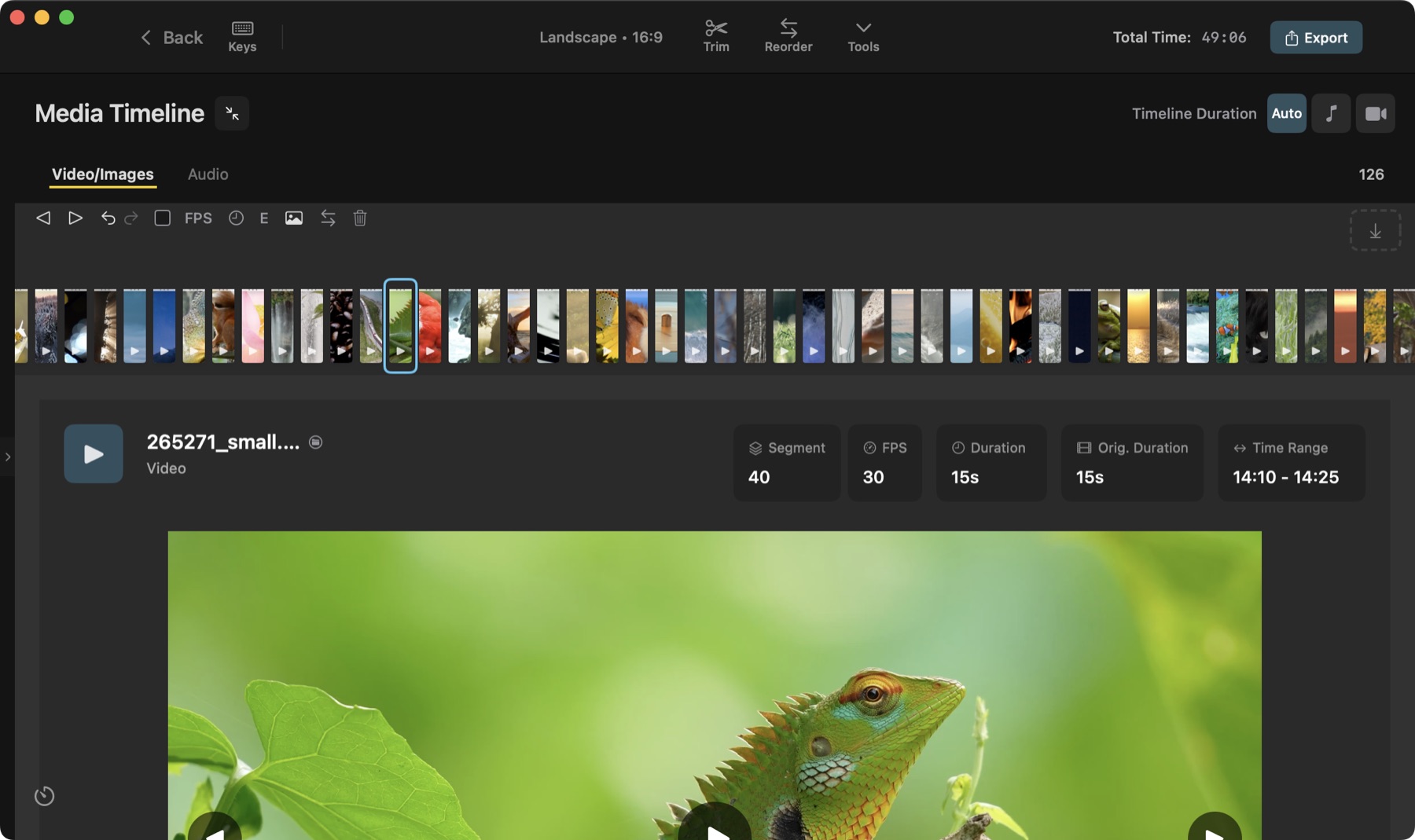
Turn hundreds of clips into one finished video. The timeline works like a playlist where clips sit end to end in order. Trim one clip or every clip, and the timeline updates as you go with nothing to wait on.

The ClipBatch timeline, every clip a vertical bar
Every clip is a bar. The selected one is outlined.

300

clips on one timeline

18

aspect ratios in one batch export

01Automatic placementclips land in order the moment you drop them in. no gaps, no dragging things into position
02Batch editsapply an edit to every clip at once, or just the ones you select. trim, add text, adjust brightness, blur, borders, fades, color labels, and more
03Reorderingreorder the whole timeline at once, or move just the clips you select. sort by name, duration, or frame rate. shuffle, move a clip to any position, or send it to the start or end
04Filtersnarrow the timeline by frame rate, resolution, video or image, silent or with audio, color label, tag, or your own notes. what’s showing is what exports
05Hot keys50+ shortcuts with search and favorites
06Export modesfull timeline, selected segments, or separate files

Editing tools / 15

The unified editing tools window, trimming clip 43 of 300
trimming clip 43 of 300. every control carries apply to selected and apply to all

02 / Templates  /  38 available

Transitions, effects, multi view layouts, text animations, background animations, and static backgrounds.

The templates browser, 38 templates with category filters, search and favorites
the templates browser. search by name or number, filter by category, star your favorites

03 / Utility Tools  /  37 available

Single purpose tools that do one thing well. Drop in files or folders depending on the tool, and they all run at once. 32 work on video, 19 on images, 6 on audio.

01AnnotationsDraw and annotate on images and videos frame by frame
02Aspect RatioConvert to any aspect ratio with fit
03Audio VisualizerCreate spectrum visualizations from audio
04Background RemovalRemove backgrounds from images
05BoomerangLoop videos forward and backward
06Color GraderAdjust colors and apply filters
07Color PaletteExtract dominant colors from images
08Color TransferTransfer color mood from a reference image
09Deep DiveAnalyze directories of media files
10Embed AudioEmbed audio tracks into videos
11Extract AudioExtract audio tracks from video files
12Find HighlightsFind the best clips from videos using AI scoring
13Find MatchesFind matching media across files
14Frame CompilerCompile image sequences into video
15Frame ExtractorExtract frames from videos as PNG or JPEG
16FreestyleAdd text and logo watermarks
17GIF MakerCreate animated GIFs from videos
18Image CollageCombine multiple images into one
19Image OrganizerOrganize by resolution, format, ratio, color depth
20KaleidoscopeCreate kaleidoscope mirror effects
21Ken Burns EffectCreate animated pan & zoom from still images
22MaskingMask video through shape windows
23RankingCompare images side by side and rank the best
24Reverse VideoReverse video playback order
25RotatorRotate and flip videos and images
26Scene SplitterDetect and split videos by scene changes
27Slow MotionSlow videos down by repeating frames
28Sprite SheetsGenerate sprite sheet grids from videos
29Stop MotionPreview and compile stop motion sequences
30Thumbnail GeneratorFind the best thumbnail frames from videos
31TimelapseSpeed up videos by skipping frames
32Timeline AnalysisVisualize video quality scores over time
33Timestamp BurnerBurn date/time stamps onto photos & videos
34Trim AudioTrim audio files to keep only what you need
35Trim VideosAlign an audio track with video and trim both
36Video CollageCombine videos from folders into grid layouts
37Video OrganizerOrganize by FPS or resolution

04 / Get It

Pay once. $49.99.

Lifetime updates.

Buy on the App Store

Requires macOS 15.0 or later and Apple Silicon.